
OCI: Serve Content with Caddy
Object Storage is a powerful, flexible, and cost-effective way to store and serve enormous amounts of data. Let me walk you through a real-life use case with an odd twist.


Object Storage is a powerful, flexible, and cost-effective way to store and serve enormous amounts of data. Let me walk you through a real-life use case with an odd twist.
Applications and services interact with buckets using the provided API, command-line interface, SDK, and good old URL. Each method has its own benefits, and one uses them as needed. In my scenario, the application handles uploads and replacements, while Caddy (the lightweight web server) handles the web front and proxies requests to application components.
In this scenario, a Caddy server masks the actual bucket URL, using rewrite rules and configuration variables. Plus, for static content in the bucket, we need to inject the access token or a Pre-Authenticated Request (PAR).
The final request processing steps are:
- Identify a static content request, for example, path matches/images/*.
- Rewrite the request to match the object's URI in the target bucket.
- Forward the new request to the bucket, using the recommended Oracle Object Storage URI.
For a while, Oracle has introduced dedicated object storage endpoints. To see the difference between the traditional and recommended URI, open any object in the bucket.
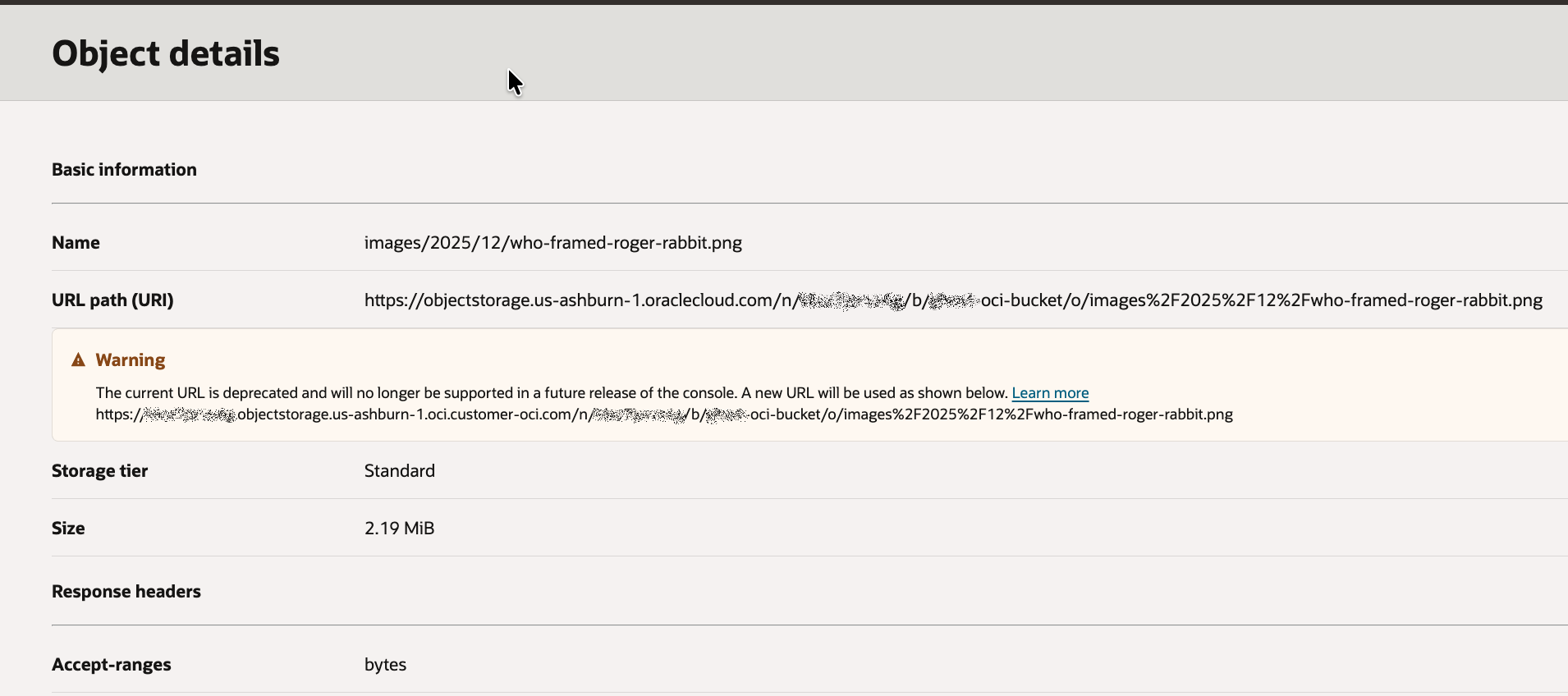
Following the third factor, the complete URI in the configuration should look like:
https://${OCI_SPACE}.objectstorage.${OCI_REGION}.oci.
customer-oci.com/p/${OCI_PAR}/n/${OCI_SPACE}/b/${OCI_BUCKET}/o/${URI}
Where variables are:
- OCI_REGION - the target OCI region, in my case: us-ashburn-1.
- OCI_SPACE - the unique identifier, one per tenancy. You may see it in other services that rely on object storage, for example, Container Registry.
- OCI_PAR - The token, required for private bucket access. In my case, the par token works only for objects with names beginning with images/*
- OCI_BUCKET - The name of the bucket, with the site objects.
The configuration file for my application is
app.example.com {

    map {$OCI_PAR} {oci_path} {oci_host} {
     PUBLIC  /n/{$OCI_SPACE}/b/{$OCI_BUCKET}/o/{uri}
     default /p/{$OCI_PAR}/n/{$OCI_SPACE}/b/{$OCI_BUCKET}/o/{uri} ${OCI_SPACE}.objectstorage.${OCI_REGION}.oci.
customer-oci.com
	}

    @asset expression `{uri}.startsWith("/images/")`
    route @asset {
	   rewrite /images/* {oci_path}
	   reverse_proxy https://{oci_host} {
            transport http {
			   tls
	        }
        }
    }
	reverse_proxy http://app_host:8080
	encode gzip zstd
}
Caddy Server Configuration
Some explanation for map and @asset definitions:
- The map structure uses the $OCI_PAR environment variable to calculate Caddy variables oci_path and oci_host. If $OCI_PAR contains public, the object path would not contain the $OCI_PAR token; otherwise (default case), it will start with the /p/ clause. Since the Object Storage host FQDN does not depend on the token value, only the default section declares the value, and it will be the same for all cases.
- The precalculated condition @asset evaluates to True or False for the expression, depending on whether the URI starts with the string "/images/".
The route intercepts requests when the @asset expression is True, then rewrites the request path using the generated object path and sends the result to the bucket over a TLS connection.
I have tested this scenario using OCI CLI, Node.js SDK, and simple cURL calls from the command line. It worked, and my compute instance could access objects, yet the Caddy container has continued to throw the host access error. After a short investigation, I realised that the Caddy container, for some mysterious reason, was unable to resolve the recommended OCI Object Storage URI. Yet, it had no issues resolving the classic Object Storage URL.
After a minor adjustment in the mapping declaration, Caddy was able to serve static requests.
map {$OCI_PAR} {oci_path} {oci_host} {
    PUBLIC  /n/{$OCI_SPACE}/b/{$OCI_BUCKET}/o/{uri}
    default /p/{$OCI_PAR}/n/{$OCI_SPACE}/b/{$OCI_BUCKET}/o/{uri} objectstorage.${OCI_REGION}.oraclecloud.com
}